| |
|
Microchip TCP/IP Stack v3.75.5 (beta)
Contents
Download zip file (866KB)

Uploading the HTTP documents
If you selected the MPFS_USE_EEPROM option
to store the HTTP documents in an external serial EEPROM, you must
upload the file system image by using FTP or via the serial command
interface with XMODEM.
First you must create a MPFS binary image of the HTTP server documents,
to do so you must use the MPFS.EXE utility
passing as arguments the directory where the source documents are
located (the example website documents are in the
html directory) and the name of the output file that will be
later uploaded.
If your design includes the new Microchip 25LC1024 serial EEPROM, you
must create the image using the MPFS.EXE /l
option (24 bit addressing). Remember also to include the
USE_25LC1024 macro in your hardware
configuration file to include the appropriate code and settings for
this memory device.
Figure 1 below shows a command prompt window after generating the
MPFS image.
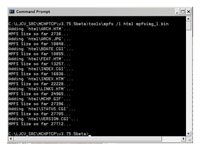
Figure 1
[Click on the image for a larger view]
Double check that your image file does not exceed the available capacity
of the EEPROM memory, the stack reserves the first 64 bytes to save the
application configuration information and the rest of the memory is
available for the HTTP documents image (which includes a simple File
Allocation Table).
Nor FTP or the XMODEM uploading options check for available memory space,
if you exceed the actual available memory, the code will wraparound and
start writing over the previously written FAT and documents.
The current distribution includes MPFS images generated from the sample
HTTP documents located in the html directory.
The file mpfsimg.bin is the MPFS binary image
with the standard 16 bit addressing (for a 25LC256 or 24LC256/512) and
the mpfsimg_l.bin the binary image with 24 bit
addressing (for a 25LC1024), both files are located in the current version
top directory.
Uploading the HTTP documents binary image with FTP
To upload your image to memory via FTP just use the FTP command available
in any Windows or Unix machine, enter the username (the default is
ftp) and the password (the default is
microchip) and then execute the
put command providing the file name of your
image file.
Figure 2 shows the command prompt window after transferring the MPFS
binary image using FTP.
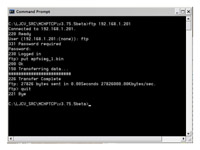
Figure 2
[Click on the image for a larger view]
|
|
|
|

