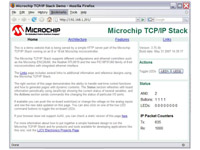
If you included the HTTP server in TCP/IP Stack code image using
any web browser you can connect to the server using the board IP
address or optionally if you included the NetBIOS Name Service
module using the assigned hostname with an URL such as
http://PICNET1/.
The browser window will show a screen similar to the image shown in
Figure 1 below
Notice that the home page includes AJAX code to continuously update
the status of several variables shown on the page such as the IP
packet counters or the LEDs status. The sample HTTP documents
includes a variant of the home page without the AJAX code but
including the variables, the whole page will reload automatically
every few seconds and the variables will show the updated value.