| |
|
Microchip TCP/IP Stack v3.75.5 (beta)
Contents
Download zip file (866KB)

Using the serial interface
When the TCP/IP Stack code starts to run after Reset, the code will
send the current IP address via the serial interface.
If you compiled the stack code with the
ENABLE_BUTTON0_CONFIG option, when you
reset the microcontroller and hold low for an instant the I/O pin
mapped to BUTTON0_IO the code will
run the configuration routine via the serial interface.
Note about configuration information stored in EEPROM:
If you use an external serial EEPROM, the current stack code will
reserve the first 64 bytes to write the configuration information,
such as IP address, netmask, etc.
When you run the stack code for the very first time the default
configuration hard coded in program memory will be written to the
serial EEPROM. The next time the stack code starts will load the
previously stored configuration from the serial EEPROM.
If you change the default hard coded configuration in the
config.h file, you must invalidate the
previously stored configuration in the serial EEPROM.
To do so hold low the I/O port mapped to
BUTTON0 for at least 4 seconds after reset or while in
the serial configuration menu, the old configuration in the
serial EEPROM will be mark as invalid, and the serial interface will
show a message, the LEDs will turn on for few seconds and the
microcontroller will reset automatically.
After Reset the code will write the new default configuration into
the serial EEPROM.
Note that the BUTTON0 option to rewrite
the configuration in the serial EEPROM and the configuration menu
via the serial interface will be included in the code only if you
define the ENABLE_BUTTON0_CONFIG macro
in the config.h file.
(The stack default configuration for the serial interface is 19,200 bps,
8 bits, 1 stop bit, no parity).
Figure 1 shows the terminal screen after forcing a configuration change.
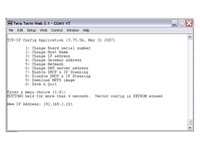
Figure 1
[Click on the image for a larger view]
|
|
|
|

