| |
|
Microchip TCP/IP Stack v3.75.5 (beta)
Contents
Download zip file (866KB)

Testing the TCP/IP Stack
After building the code and programming the microcontroller, you may
have to perform a Power-On-Reset (power cycle) if you changed the
microcontroller's configuration bits since the microcontroller only
loads them after a Power-On-Reset and not after a normal Reset.
If everything is correct the LED connected to the pin mapped to
LED0_IO will start blinking about once a
second, and if you have a LCD module, it will show the "TCP/IP v3.75.5b"
legend on the first line and the current IP address on the
second line, and after a very small delay both lines will start showing
the values for the IP Tx and Rx packet counters.
Also if you have connected serial interface and a terminal program
(the stack default configuration for the serial interface is 19,200 bps,
8 bits, 1 stop bit, no parity) you will see the current IP address on
the terminal screen.
Sending ICMP echo requests (ping)
The most popular program today available in almost any operating
system to test if you can reach a remote IP host is
ping, which sends an ICMP message packet to a remote host requesting
an "echo reply".
The stack (unless it was disabled in the configuration file) includes a
basic ICMP module that will reply to an "echo request".
Be aware that the current version only supports ICMP requests with a
payload no larger than 32 bytes, then in some operating systems
(Windows default is 32 bytes) you will need to specify the packet size.
Figure 1 below shows the command screen after running a ping to a PICNet 1
board running the TCP/IP Stack.
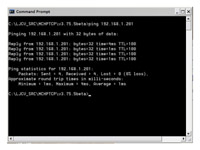
Figure 1
[Click on the image for a larger view]
|
|
|
|

