Description
The Microchip PICDEM.net 2 Demonstration Board, is of the first development
boards produced by Microchip featuring the new PIC18FXXJ60 family of
microcontrollers with an internal Ethernet controller on the chip.
The board includes a 100-pin PIC18F97J60, a 25LC256 SPI Serial EEPROM,
an external Ethernet interface implemented with the ENC28J60, a potentiometer,
a 16x2 character LCD module, a RS232 serial interface, four user pushbutton
and some LEDs.
This project will show you how to run the modified version of the latest
Microchip TCP/IP stack on the Explorer 16 Board.
|
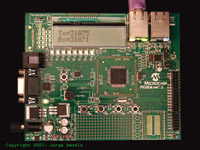
Microchip's PICDEM.net 2
[Click Image to Enlarge]
|
Design considerations
PICDEM.net 2 modifications
The are not required board layout or circuit changes to the PICDEM.net 2,
it can run the modified TCP/IP stack as is out of the box. Actually the
one I received from Microchip had the microcontroller preloaded with a
version of the 3.75 TCP/IP stack for the PIC18F97J60.
Microcontroller selection & external memory
As mentioned before the board includes a 25LC256 Serial EEPROM that will
be used for storing configuration information and HTTP server documents.
Microcontroller Clock Frequency
To support the internal Ethernet controller, the PIC18F97J60 requires a clock
source of 25MHz, but the TCP/IP stack code set the configuration bits to use
the PLL block to generate an internal cpu clock of about 41.6667MHz.
Schematics
The PICDEM.net 2 User's Guide includes detailed schematics for the board
on Appendix A. There is a link below pointing to the latest version of
this document from Microchip.
|
Getting the board up and running
Compiling the firmware is not a huge or complicated task, it requires few
software tools available for download from Microchip's
website at no cost, and obviously the TCP/IP stack source code distribution and a
PIC programmer. For this project I used Microchip's
MPLAB ICD2 as a programmer.
With the latest modified version of the
Microchip TCP/IP Stack v3.75, the process is quite simple.
This new version adds the PICDEMNET2 macro definition that
combined with the device selection for the Microcontroller generates the appropriate
code for this particular project.
The software distribution includes the MPLAB IDE project file
PICDEMNET2.mcp, load this project into MPLAB IDE,
select the correct processor (by default the project has selected the PIC18F97J60)
and verify that the settings on the config.h and
picdemnet.h files apply to your project or modify them
accordingly (both files are located in the include
subdirectory of the main src directory).
For additional details check the README.TXT file
included in the software distribution.
For a detailed explanation about how to build Microchip's TCP/IP stack
for this or similar projects Click Here.
|




